-
Hi All,
I purchased the software version 6 to indexing content of files exist in external drive but the software is not working properly while indexing got hung and give error of Zoom engine not responded. Hence indexing cannot be saved.
Please help me as I have to urgently use that software to provide report to someone. I have also marked you email guyz but still don't have any response over it.
Regards,
Pawan Kumar
+91-9213414604
pwnkmr42@gmail.comLeave a comment:
-
My first guess would be that you aren't in fact looking at two PST files in the recycle bin.
When Windows moves a file into the recycle bin the file is renamed to a semi-random file name, and a new file with meta data is created. The meta data file has the same file extension as the original file. So the deletion of one PST file will result in two .PST files being in the recycle bin.
When you view this in Windows Explorer, this is hidden from the user. But you can see this in OSF. The file in the red box below is a meta data file. It isn't really a PST file. All the meta data files have a file size around 544 bytes.
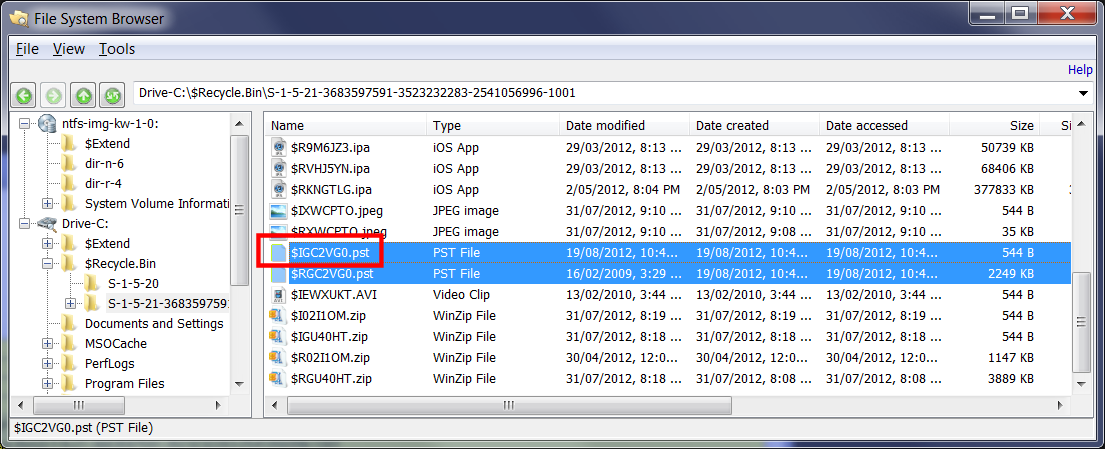
However the other original PST file should be available to be indexed. I tested this here and didn't see any problem. See below.

Was there some type of error when you tried to view the file with the internal viewer?
Did you check the indexer log to see if there was some error reported by the indexer?Leave a comment:
-
Yes, I can imagine this is a problem. Can you E-mail us one of the offending MP3 files and we'll get it fixed. The MP3 format is actually a bit complex as there are a lot of minor variations to the format floating around.The MP3info process, that seems is started when indexing encounters an mp3 file, crashes on some .mp3 files
Might be better to start a new thread for these specific problems. It will make it easier for others searching for a similar problem.Leave a comment:
-
I encountered an indexing problem today. Besides other options I checked E-Mail & Attachments for indexing. No emails were indexed, although there were two deleted PST-Files in the RECYCLER directory.
I was able to find the files by File Name Search searching for *.pst. But was not able to access the file with the internal viewer. OSF could not make a temporary copy of the file nor handle the PST-file as an outlook file.
Any ideas what happened here?
have a nice weekendLeave a comment:
-
I just experimented a couple problems that fall into the "Trouble Indexing" category ..
1) The MP3info process, that seems is started when indexing encounters an mp3 file, crashes on some .mp3 files, windows gives a message about "wait for program or quit program .." and indexing is paused until i don't click "OK". Indexing is a long task that i tipically leave running overnight unattended so this can be a big problem ..
2) Because of problem 1 i stopped indexing and started it again but first i manually removed .mp3 and some other extensions fron the list of file types to index but OSF ignored this and again started to pause with errors in MP3info process on some musical files
My environment is: Windows 7 Ultimate x64, 8gb ram - OSF v1.2 alpha 2
but i had these same problems with other versions tooLeave a comment:
-
This problem has be closed in V1.2. You can find current Alpha / Beta release here,
http://www.passmark.com/forum/showth...a-Beta-release
The problem was a bug in the indexing process. It happened when indexing a disk image, using direct access mode and the partition being indexed was not the 1st partition in the image. The bug has been corrected in V1.2. Thanks for your help in resolving it.Leave a comment:
-
Hi Mark,
I did send the log to your e-Mail Address. I also tested the 1.2 Alpha. It did not solve the existing problem. I started the pgme as admin and tried to index the whole drive. (E:\Evidence\bm02\bm02.E01, Partition No 1).The pgme runs without any fault through the pre-scan step.
Best regards
Horst
Leave a comment:
-
Hi David,
thank you for your support and the alpha. I´ll try the alpha and send the log to info [@] passmark.com. I`ll keep in touch.
best regards
HorstLeave a comment:
-
Thanks for your patience. Would have been nice to get the log. We are really just guessing at possible reasons without it.
Here is something else to try.
Copy the PST files from the disk image into a temp folder on your hard drive. Then index the files from your temp folder. (You can copy the files from the File Browser window in OSF).
Also, an alpha build of OSF V1.2 is now available.
Can you download this new build and give it a go. There has been a lot of changes in the area of direct access to images and also some changes to the handling of PST files.
http://www.passmark.com/forum/showth...a-Beta-release
If this doesn't fix it then I think we will really need to get some logs from you.
Also can you let us know if the image contains multiple partitions? And you are indexing from a partition besides the first (partition 0) when you mounted the image?Last edited by Ray (PassMark); Aug-02-2012, 07:56 AM.Leave a comment:
-
Indexing problem
Hi Ray,
I added the image in both ways. Indexing failed in both ways. It started and stopped with an error after approx 160 words. I faced this problem by indexing E-Mails and office docs. It is very strange. all I want to do is extracting E-Mails from an ordinary PST-File.
best regards
Horst
Leave a comment:
-
Horst,
We couldn't reproduce the problem using the latest public build and some test Encase images. But getting your log would still be good if possible.
Can you confirm that you added the image file via the option in the screenshot here, circled in blue?
That is, you have selected the "Image file" radio button for the "Data source" and NOT via the "Drive letter" or the "Mount image" underlined option (which launches OSFMount).
Please make sure to add a device using the "Image file" option, and NOT OSFMount, and try again.
If you did index from a device that was mounted via OSFMount, you need to make sure that the image file is still mounted before indexing. That is, if you have rebooted the machine since mounting the image, then it would no longer be mounted and the error you see could happen.Leave a comment:
-
And by the way. The problem also occured for office docs indexing.Leave a comment:
-
Hi Mark,
thanks again for your fast response.
In the meantime I created a new case and directly added the device to the case. started again indexing and faced the same troubles again.
--- System Messages copied from blog
Zoom Search Engine Indexer 64-bit (Enterprise Edition)
Version 7.0.osf15 (Build: Custom for OSForensics) on Windows 7
Start indexing (offline mode) at Fri Jul 27 11:34:47 2012
---
--- Warning messages coipied from blog
No files found to index in bm02-1_C:
Check that the path exists and that files satisfies configuration settings
---
--- Error Messages copied from log
Failed to mount device E:\Evidence\bm02\bm02.E01 (bm02-1_C)
... one line
Invalid folder (does not exist): bm02-1_C:
---
I did save the whole log of the indexing process. If you could provide an email address I shall send it to you personally.
best regards from Austria
Horst
PS: there are no kangaroos in Austria.
Leave a comment:

- If this is your first visit, be sure to check out the FAQ by clicking the link above. You may have to register before you can post: click the register link above to proceed. To start viewing messages, select the forum that you want to visit from the selection below.


Copyright PassMark Software Pty Ltd
Powered by vBulletin® Version 6.2.3
Copyright © 2026 MH Sub I, LLC dba vBulletin. All rights reserved.
Copyright © 2026 MH Sub I, LLC dba vBulletin. All rights reserved.
All times are GMT. This page was generated at 07:13 AM.
Leave a comment: